Spin-off, Split- Join and Split for each
Showing posts with label PEGA Interview Questions and Answers. Show all posts
Showing posts with label PEGA Interview Questions and Answers. Show all posts
Friday, 27 June 2014

ticket: explain any scenario u used
Use the Ticket shape ( ) to mark the starting point for exceptions that may arise at any point in the flow, such as a cancellation. The ticket is a label for a point in a flow, much like a programming "GOTO" destination.
What is Notify?
When you want to configure your flow to automatically send notification messages about assignments, connect a notify shape to the assignment. A notify shape identifies a notify activity.
In Routing activity what is the default property used to route the object
pxRouteTo=Param.AssignTo =” work basket name” for work basket .s
For work list:
pxRouteTo =Param.Worklist=”true” && Param.AssignTo =” pxRequestor.pyUserIdentifier” for work list.
For work list:
pxRouteTo =Param.Worklist=”true” && Param.AssignTo =” pxRequestor.pyUserIdentifier” for work list.
Default data table where the instance of the class are store (how it will search ) pc_work
PC_ work
1. Workbasket assignments are stored in a single pr_assign_workbasket table.
2. Worklist assignments are stored in a single pr_assign_worklist table.
3. The Work- base class is mapped to the pc_work table, a table with columns that represent all the work object properties that need to be exposed for flow processing to function correctly. Map your work object classes to either the pc_work stable or another table that has the same columns.
4. The Data- base class is mapped to the pr_data table. Map your data classes to either the pr_data table or another table that has the same columns.
5. all Rule related data will be stored in pr4_pegarules.
6. The pr_other table is the last resort or default destination for saved insstances that belong to a class that is not mapped to any other tables
1. Workbasket assignments are stored in a single pr_assign_workbasket table.
2. Worklist assignments are stored in a single pr_assign_worklist table.
3. The Work- base class is mapped to the pc_work table, a table with columns that represent all the work object properties that need to be exposed for flow processing to function correctly. Map your work object classes to either the pc_work stable or another table that has the same columns.
4. The Data- base class is mapped to the pr_data table. Map your data classes to either the pr_data table or another table that has the same columns.
5. all Rule related data will be stored in pr4_pegarules.
6. The pr_other table is the last resort or default destination for saved insstances that belong to a class that is not mapped to any other tables
How can i store the instance of the class in the data base
creating the separate DB table for that work class with in the DB, or map to external db and further saves will go to that DB
Difference between obj-list, rdb-list?
Obj-list : Retrieve to a page, read-only, a selected set of properties
Import ant fields Obj-List:
RequestType: The Type of the browse; allows different processing or sets of properties to be defined. Defaults to Standard. Key-part to the Rule-RDB-SQL instance.
Access: An indication of the database package used to access this table, from the INI file (currently ODBC). Key-part to the Rule-RDB-SQL instance.
ClassName: The object class on which the browse is performed.
Rdb-list: To Retrive external Relational Database List.
Import tant fields in RDB-List:
PageName: Page Name indicating where the results will be put
ObjClass: The object Class to List. When used with RuleObjList parameter, this is the class of the list to use.
Import ant fields Obj-List:
RequestType: The Type of the browse; allows different processing or sets of properties to be defined. Defaults to Standard. Key-part to the Rule-RDB-SQL instance.
Access: An indication of the database package used to access this table, from the INI file (currently ODBC). Key-part to the Rule-RDB-SQL instance.
ClassName: The object class on which the browse is performed.
Rdb-list: To Retrive external Relational Database List.
Import tant fields in RDB-List:
PageName: Page Name indicating where the results will be put
ObjClass: The object Class to List. When used with RuleObjList parameter, this is the class of the list to use.
How to store the instance of the class in a specific database
Creating the separate DB table for that work class with in the DB, or map to external db and further saves will go to that DB
Performance of our work in the pega is measured using?
DBTrace: DBTrace is a feature in the Performance Analysis Tool (PAL) that creates a detailed log of calls to the PegaRULES database. DBTrace displays SQL statements sent to the database and the time spent for each operation.
PAL: This data is stored in "PAL counters" or "PAL readings." PAL stands for Performance AnaLyzer, and is a collection of counters and timer readings, stored in the requestor, that an application developer could use to analyze performance issues in a system.
PAL Features:
• Add Reading
• Add Reading with Clipboard Size
• Reset Data
• Save Data
• Start DBTrace
• DBTrace Options
• Start Profiler
• Show Graph
• My Alerts
Alerts:
During application processing, Process Commander writes to the performance alert log a sequence of text entries called alert messages that identify mainly performance-related issues or errors. The performance alert log is usually named PegaRULES-ALERT-YYYY-MMM-DD log.
AES:
Exceptions are processed in a similar way as alerts. When a Process Commander server generates exceptions they are sent by SOAP to the AES system. The system parses the exceptions and stores the records in the pegaam_exception table in the AES database. Based upon how often an exception occurs and the system events that triggered those exceptions, AES aggregates these records into work objects called AES exception items. These items are written to the AES database in the pegaam_exception_work table.
PAL: This data is stored in "PAL counters" or "PAL readings." PAL stands for Performance AnaLyzer, and is a collection of counters and timer readings, stored in the requestor, that an application developer could use to analyze performance issues in a system.
PAL Features:
• Add Reading
• Add Reading with Clipboard Size
• Reset Data
• Save Data
• Start DBTrace
• DBTrace Options
• Start Profiler
• Show Graph
• My Alerts
Alerts:
During application processing, Process Commander writes to the performance alert log a sequence of text entries called alert messages that identify mainly performance-related issues or errors. The performance alert log is usually named PegaRULES-ALERT-YYYY-MMM-DD log.
AES:
Exceptions are processed in a similar way as alerts. When a Process Commander server generates exceptions they are sent by SOAP to the AES system. The system parses the exceptions and stores the records in the pegaam_exception table in the AES database. Based upon how often an exception occurs and the system events that triggered those exceptions, AES aggregates these records into work objects called AES exception items. These items are written to the AES database in the pegaam_exception_work table.
Inheritance concept in the pega (rules, class)
Rules: inheritance that can maximize reuse of your rules while allowing localized overriding as appropriate. Also called polymorphism, inheritance allows a rule created for one class (possibly an abstract class) to be applied to other classes that inherit from it.
Class inheritance searches for rules from a concrete, lower class, up the class hierarchy to find available rules.
Two types of class inheritance — directed inheritance and pattern inheritances
Class inheritance searches for rules from a concrete, lower class, up the class hierarchy to find available rules.
Two types of class inheritance — directed inheritance and pattern inheritances
Difference between obj-open and obj-open-by-handled
Obj-Open : we will get mutiple records from table based on the criteria from the specified calss. Or Opens an instance of a given class
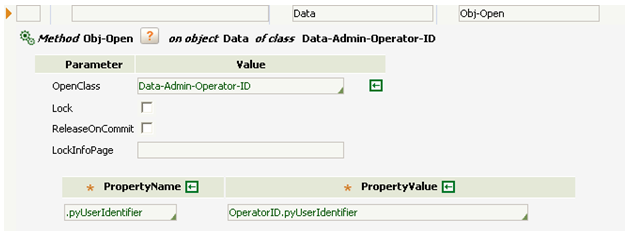
OBJ-open-handle: here we have have to pass the pzInskey as a instance handle, this mehod will open only one record at time. Or Open object by handle to the pzInsKey value

The handle of an instance is a unique key, in an internal format, assembled by the system that identifies an instance in the PegaRULES database. It may differ from the visible key generally used to identify instances. (Every instance has a unique handle, but more than one instance may share the same visible key.) For rule instances, the handle includes system-generated identifying values (including the create date and time) that make it unique.
Use the Obj-Open-By-Handle method only if you can determine the unique handle that permanently identifies which instance to open. Otherwise, use the Obj-Open method.
OBJ-open-handle: here we have have to pass the pzInskey as a instance handle, this mehod will open only one record at time. Or Open object by handle to the pzInsKey value
The handle of an instance is a unique key, in an internal format, assembled by the system that identifies an instance in the PegaRULES database. It may differ from the visible key generally used to identify instances. (Every instance has a unique handle, but more than one instance may share the same visible key.) For rule instances, the handle includes system-generated identifying values (including the create date and time) that make it unique.
Use the Obj-Open-By-Handle method only if you can determine the unique handle that permanently identifies which instance to open. Otherwise, use the Obj-Open method.
Diffrence between activity and uitility
An activity is an instance of the Rule-Obj-Activity rule type. An activity is the fundamental sequential processing unit of the Process Commander system.
the shape in a Visio flow diagram, references an activity that updates a work object, but does not require user interaction and input. Your system includes standard activities for utility tasks, and you can create additional ones.
Each utility task references an activity with an Activity Type of Utility ss from utility shape we can call activity but vise versa not possible.
the shape in a Visio flow diagram, references an activity that updates a work object, but does not require user interaction and input. Your system includes standard activities for utility tasks, and you can create additional ones.
Each utility task references an activity with an Activity Type of Utility ss from utility shape we can call activity but vise versa not possible.
How to import rules using pzinskey
Open the rule, from that pick the pzinskey, go to prdbutil and using the pxinskey export the rule Import that zip file where you want .
Where can i see the paramater values in the clipboard ( values ... i am passing one activity to other )
No its not possible in clipboard, but you can see in tracer by clicking page name which in step method column .
Subscribe to:
Posts (Atom)